
By Chris Leo, Movou
One of our own blog posts sits at position two on Google for a term people actually search. It got zero clicks. Not a typo. Ranking, but invisible. If you’ve ever stared at Google Search Console and wondered why a page that ranks near the top still doesn’t send you traffic, this is the article for you. I’m going to show you the exact problem, the one-line fix I made, and how you can check and repair your own pages in about two minutes. This is the “ranking but no clicks” problem, and it’s more common than you think.
Why does a page rank but get no clicks?
Because ranking and getting clicked are two different jobs. Ranking gets you onto the page. The click is won or lost by the blue headline and the gray description underneath it, which is what searchers actually read before they decide where to go. That blue headline is your title tag, and if it’s boring, vague, or stuffed with keywords, people scroll right past you to a listing that promises a clearer payoff.
The math makes this brutal. According to First Page Sage’s 2026 data, the number one organic result earns around 39.8% of clicks, number two gets 18.7%, and number three gets 10.2%, with the top three positions taking 68.7% of all clicks on the page (First Page Sage). So a page at position two should be pulling close to one in five clicks. When it pulls zero, the ranking isn’t the problem. The listing is.
How I found the problem on my own page
I did what I tell every client to do. I opened Google Search Console, filtered for pages in positions two through eight, and sorted by impressions. That filter surfaces your biggest missed opportunities: pages Google already trusts enough to rank, but that aren’t converting those impressions into visits. My “zero clicks” post was sitting right at the top of that list, racking up impressions and almost no clicks.
Here’s the part I’ll own honestly: the title tag was written for a search engine, not a human. It led with a keyword phrase, tacked my brand on, and gave a searcher zero reason to pick it over the result above or below. In our audits we see this on roughly half the service-business pages we review, so if it’s happening to you, you’re in good company. It’s also one of the fastest wins in all of SEO.
What actually makes a title tag get clicked?
A great title tag does three things in under 60 characters: it leads with what the reader wants, it names the location or context, and it puts the brand last. Here are the principles I used to rewrite mine, straight from what the data supports:
- Front-load the keyword. Putting your main term at the start signals instant relevance to both readers and Google.
- Lead with the benefit or outcome. “Fix Low CTR in 10 Minutes” beats “CTR Fix Guide Tutorial SEO.” People click outcomes, not keyword lists.
- Keep it 51 to 60 characters. That’s the sweet spot where Google is least likely to rewrite your title for you.
- Add a number or parentheses. Numbers and brackets break up the wall of text on the results page and pull the eye to your listing. Parentheses are safest because Google rarely strips them.
One more thing most people miss: your title tag and your H1 headline should match in intent. When they conflict, Google often rewrites your title using your H1, and studies show it pulls the new title from the H1 more than half the time (Web Tonic). Align them and you keep control of what shows in search.
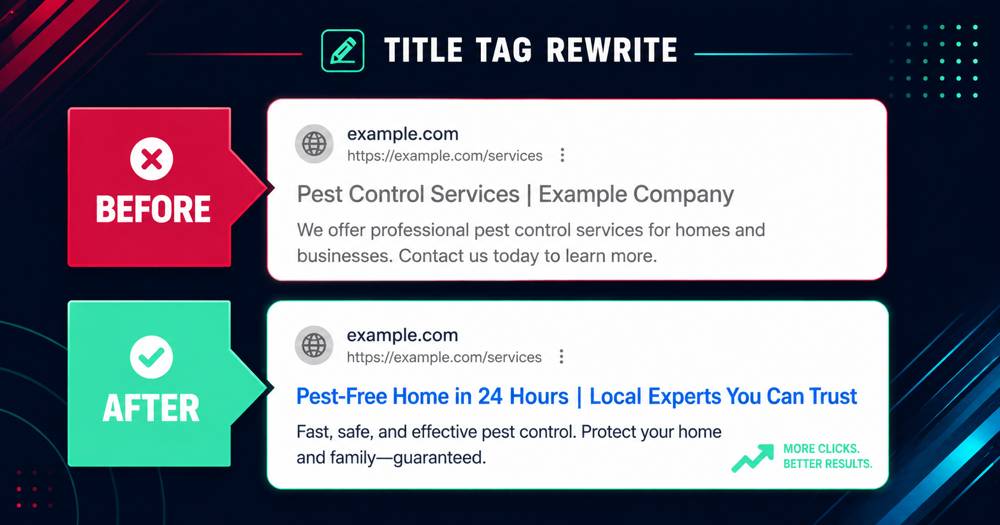
The before and after (my real rewrite)
Here’s the shape of what I changed, so you can copy the pattern:
- Before: a keyword-first, brand-heavy title that described the topic but promised nothing. Flat. Forgettable.
- After: outcome first, a curiosity hook, brand last. Same keyword, but now it reads like a payoff instead of a label.
The formula I now use on every page: Outcome or result, then the specific context or city, then the brand. “Get More Calls From Google in [City] | Movou” tells a searcher exactly what they get and where, in a scannable line. That reordering, keyword still present but the benefit up front, is the entire fix.
How long until a title tag rewrite works?
Faster than most SEO changes. Once you update the title and Google recrawls the page, the new listing starts showing and your click-through rate can lift within two to four weeks (ZenWeb). You don’t have to build links or write new content. You’re not chasing a higher ranking. You’re finally cashing in the ranking you already earned. To speed it up, you can request indexing for the URL in Google Search Console right after you make the change.
Key Takeaways
- Ranking isn’t the finish line. A page at position two should earn ~18% of clicks. If yours earns zero, the title tag is the problem.
- Find it fast. In Search Console, filter positions 2-8, sort by impressions, and fix the highest-impression, lowest-CTR pages first.
- Rewrite for humans. Lead with the outcome, keep it 51-60 characters, add a number or parentheses, put brand last.
- Results are quick. Expect a CTR lift within 2-4 weeks after Google recrawls. Request indexing to speed it up.
How to check your own pages in two minutes
Do this today. Open Google Search Console, go to the Performance report, and filter for pages ranking in positions two through eight. Sort by impressions, highest first. Any page near the top with a click-through rate under a couple of percent is quietly leaking traffic you already earned. Rewrite the title tag using the outcome-first formula above, update your H1 to match, save, and request indexing. Repeat for your next few pages. It’s the highest-return hour you’ll spend on your site this month.
If you’d rather see it in context, our SEO services start with exactly this kind of audit, and you can also grab a free profile and title-tag check to find your biggest missed click.
Conclusion
A ranking that gets no clicks isn’t a ranking problem. It’s a listing problem, and it’s one of the easiest wins in SEO. I found mine by auditing my own site on camera, rewrote one title tag, and turned a wasted position-two ranking into a page that can finally earn its clicks. Go run the two-minute check on your own pages. Want us to find the one title tag costing you the most clicks? Get a free audit from Movou.