
By Chris Leo, Movou
You already know reviews matter. What you hate is asking for them. That awkward moment where you feel like you’re begging a customer for a favor keeps most service businesses stuck with a handful of reviews while their competitor down the street racks up dozens. Here’s the good news: getting more Google reviews has almost nothing to do with confidence and everything to do with timing and a simple system. In this guide you’ll learn exactly how to get more Google reviews without ever feeling pushy, and you’ll get a repeatable routine you can run after every single job.
Why do Google reviews matter so much for local businesses?
Because your next customer is reading them before they ever call you. BrightLocal’s 2026 Local Consumer Review Survey found that 97% of consumers read reviews before choosing a local business, and 41% say they now “always” read reviews when browsing, up from 29% the year before (BrightLocal Local Consumer Review Survey). People are also checking an average of six review sites before they decide, so your reputation is doing the selling long before you get a chance to.
Reviews do double duty. They convince the human reading them, and they feed Google’s local ranking system. A steady stream of fresh, keyword-rich reviews is one of the strongest signals that your business is active, trusted, and worth showing in the map pack. In our work with service businesses, the ones who collect just two or three new reviews a week almost always pull ahead of a competitor sitting on a stale pile from two years ago.
When is the best time to ask for a Google review?
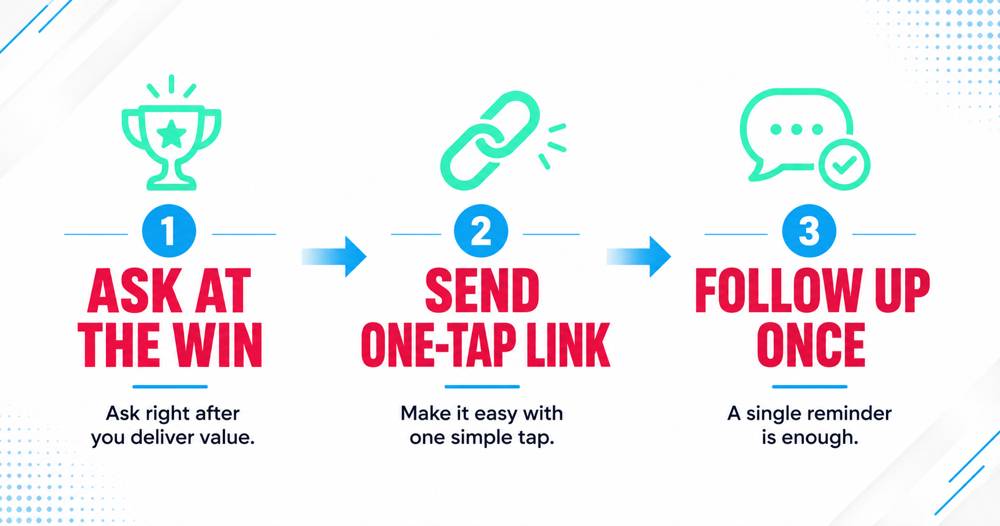
Right after a win, while the good feeling is still fresh. The single biggest mistake is waiting. If you email a customer four days after the job, the emotion is gone and so is your response rate. Ask within a few hours of the moment they’re happiest, and you’ll get far more people to actually follow through.
The best moments to ask are:
- Immediately after you finish a job and the customer says “thank you” or “this looks great”
- Right after you solve a problem that had them stressed
- When a client renews, refers someone, or gives you an unprompted compliment
Those verbal cues are your green light. When a customer tells you they’re happy, that is the exact moment to say, “That means a lot. Would you mind sharing that in a quick Google review? I’ll text you the link right now.”
How do you ask for a review without being pushy?
You make it about their experience, not your rating. Pushy sounds like “Can you give us five stars?” Natural sounds like “Would you share how the project went?” The second version invites honest feedback, which is exactly what Google wants and what future customers actually trust.
Three rules keep it comfortable:
- Personalize it. Reference the specific job. “Glad the water heater’s running again, Maria” beats a copy-paste blast every time.
- Remove every ounce of friction. Send a direct review link or a QR code, not “search for us on Google.” A one-tap link can be the difference between a review and a good intention.
- Ask once, then follow up once. A single reminder sent three to five days later can double your response rate without ever feeling naggy (Typeform). One follow-up. That’s the limit.
What does Google actually allow you to do in 2026?
This part matters, because the rules changed and a lot of businesses are still breaking them. Google’s 2026 review guidelines banned review quotas for staff and requests that push specific wording. In plain English, you cannot tell your team they each have to collect a set number of reviews, and you cannot ask a customer to mention a particular employee or repeat an exact phrase (Reputation Rhino).
You also may never ask for five-star reviews specifically, and you cannot offer a discount, entry, or gift in exchange for a review. Both are called review gating and they can get your reviews stripped or your profile penalized. The safe, effective ask is simple: request honest feedback from everyone, make it easy, and let the stars fall where they may. Do good work and the ratings take care of themselves.
Where should you put your review link?
Everywhere the customer already is. The businesses that win at reviews don’t rely on one channel. They put a direct link or QR code in the places customers naturally look after a job is done. Spread it across:
- The text message or email you send right after finishing
- Your email signature
- Invoices and receipts
- A small QR code sticker on the truck, the counter, or the packaging
- The footer of your website and a dedicated “leave a review” page
You can generate your own free Google review link from your Google Business Profile dashboard, and it’s worth doing today. Every place you add it removes one more reason a happy customer never got around to it.
Key Takeaways
- Timing wins. Ask within hours of a happy moment, not days later.
- Make it one tap. Send a direct review link or QR code, never “go search for us.”
- One follow-up doubles results. A single reminder 3 to 5 days later lifts response rates without feeling pushy.
- Stay compliant. No quotas, no scripted wording, no asking for five stars, no incentives. Ask everyone for honest feedback.
Turn it into a system you run every week
Reviews stop feeling awkward the moment they become a habit instead of a favor. Build a tiny routine: at the end of every job, send the same friendly, personalized text with your review link. Every Friday, spend ten minutes sending one follow-up to anyone from that week who hasn’t left one yet. Reply to every review that comes in, good or bad, because those replies show future customers you’re paying attention and they give Google fresh signals to read.
That’s the entire system. No begging, no scripts that feel gross, no gaming the rules. Just a consistent ask at the right moment, made effortless for the customer.
Reviews only help once Google is showing your business in the first place. If you are not appearing yet, fix that first: how to get your business to show up on Google.
Conclusion
Getting more Google reviews isn’t about being bold. It’s about being timely, easy, and consistent. Ask when the customer is happiest, hand them a one-tap link, follow up once, and stay inside Google’s rules. Do that after every job and your review count will climb on its own, right along with your ranking. Want a done-for-you review system that runs quietly in the background so you never have to think about the ask again? See how Movou can set it up for you.
More on asking, replying and removing reviews is in local marketing questions, answered.